Add Custome OEM Text and Image in System Properties

OEM stands for Original Equipment Manufacturer. You can add custome text and your own image by following some simple steps.

10 Software to Customize and Revamped Your XP

Ever felt your XP is to dull? This 10 software will surely REVAMPED your XP. Dull XP will never be in your live anymore.

Collection of Possible Ways to Put Your Name On XP

I have post many articles about putting custom text in XP and I compile them in one page, try one or preferably all of them!

16 Great and Free Vector and Image Editing Software

Whether you are finding and advanced Photoshop-like alternative or just finding a simple photo editor with advanced tools, this list might help you find one you like.

How to Creat Your Own Message Box in XP, Vista and Se7en.

Wouldn't it be fun to have a message box greets you on start-up or how about pranking you friend with a fake virus alert?

Saturday, April 30, 2011

Download Windows 8 M3 Metro UI Logon Screen for XP

In the latest Windows 8 M3 build, the logon screen is different from Windows 7 only slightly. The background is changed and the button are metro style and cool ;)

PeterRollar @ DA has recreated it for Windows XP.

The only thing missing in it is the time and date feature which is impossible to recreate in XP.
Download the Windows 8 Metro UI Logon Screen

How to Use
Method 1
First extract the file you downloaded. Then, you will find 3 file, a software called Replacer, a wallpaper, and the logonui.exe file. Open Replacer. Now go to C:Windows\System32 and find a file named logonui.exe. Copy the file and place it in somewhere safe as backup. Now, drag the logonui.exe file in system32 into Replacer window. Then drag the logonui.exe file that you've extracted into Replacer window. The rest should be easily figured. Logoff and your new logon screen is there.


Method 2
You can use TuneUp Utilities

Google Chrome Stable and Beta Update [11.0.696.60]

Google has update its browser Stable and Beta channel to 11.0.696.60. This version fix one bug which make it trough  version 11.0.696.57.

REGRESSION: Windows painting issue while switching Chrome 11 window with overlapped app.

Download
Google Chrome Standalone Offline Installer 
Google Chrome Online Installer

Sunday, April 24, 2011

4 RocketDock Tips and Tricks For New Users

Rocketdock is a cool docking software made by Punk Software. They claim it to be the greatest software made. Ever. I don't really agree but they do create a wonderful docking software. And with this few cool tricks, you can say Rocketdock maybe is the best software of its kind out there... P/s: The trick here is primarily for XP users only.


  • Accidental Aero Effects in XP
  • Hide Taskbar On the Go Permanently
  • Put Shutdown and Restart Shortcut on Rocketdock
  • Use Stack Docklet To Remove Taskbar Necessity Even More

Free Full Version Five Ashampoo Software Easter Giveaways Worth $104.95

As the Easter Festival, Ashampoo kindly released 5 Free Full Version of its software. The software are:

  • Ashampoo Anti-Malware
  • Ashampoo Slideshow Studio Elements
  • Ashampoo HDD-Control
  • Ashampoo Internet Accelerator 3
  • Ashampoo MyAutoplay Menu
The product are absolutely Free, Full Version without any obligation. Although there will still be trial message but the software are not trial, they're completely full version!

Go to The Promotional Page and click the 'Get Downloads now' button. If the coupon code are not in the box, write 'easteregg'. And if you don't have the time to download this, take your time since Ashampoo giveaways usually hold for a VERY long time..

How to Reactivate A Genuine Windows 7 That Became Pirated

You wake up in the morning, boot your computer and suddenly you are greeted with a box saying to activate your Windows 7, some text saying your Windows 7 is not genuine and your wallpaper is black-pure black. This thing happen to many Windows 7 users even Windows 7 SP1 RC users. Now that is strange since you buy Windows 7 legally as you remember so why this happen and how to fix this?  Luckily there's some ways to fix this without reinstall your OS. Here are How to Reactivate A Genuine Windows 7 That Became Pirated.

Saturday, April 23, 2011

Show Your Name Beside Windows Taskbar Clock

Seeing is believing. Learn how to edit the AM/PM symbols and change it into any custom text. No registry editing, no bloat software, in fact we will be using one of Control Panel tool.

Friday, April 22, 2011

Microsoft 'Windows XP End of Support Countdown' Sidebar Gadget...Useless But Useful for Microsoft

Microsoft will end support on XP in the year 2014. And recently, Microsoft released what to be a countdown timer sidebar gadgets for Vista and 7 users. 

Now almost anyone would think that it is an absolutely a ridiculous gadgets to put on the desktop. What's more, they released it for Vista and 7 users, which I think don't care what will happen to XP. 

Yet, actually it may be useless to us but USEFUL for Microsoft...Why? For something that Microsoft really are focusing on now...Making Everyone Windows Genuine, Get Rid Old Timer and getting IE6 out!

First I explain why Making Everyone Windows Genuine. Well an experience users that use Non-Genuine Windows OS may have experience the no wallpaper and black desktop and annoying box telling you that you have been counterfeit. Before installing, the gadget installer will check whether your OS is genuine or not.

So for anyone who knew he/she have a Non Genuine Vista or 7 and have no experience on this would fall for the trap. And it is HARD to get rid off. For a non tech savvy who got the money, he may buy a Genuine OS after getting this and, BOOM..more cash flowing in to Bill Gates. But with a quick search in Google, you'll find the solution.

The second reason, is to Get Rid of Old Timer, Microsoft are getting lazy on maintaining XP so they use the gadget so people like me will write about it and tell when will XP support ends. Thats year 2014 folks! Moreover, so people like me tell what will happen if Microsoft ends support on XP. FYI, there will be no updates, even critical security updates and no cool software support for XP too. Visual Studio will be likely not support XP. MSE, Windows Live have possibilities too.

Yet you can still buy, install and use XP. Think, a worried business man/woman worries about his/her PC security and buy Windows 7 and BOOM, another XP user is get rid off and more money flouring into Bill Gates pocket.

Lastly, to getting IE6 out! This old browser has been bothering Microsoft for years. Not only it makes web developers working hard to make their work compatible with IE6, IE6 is also hard to protect from todays hacker and malware. And also since IE6 is only available to XP and the OS before it, getting rid of XP mean getting rid of IE6! With market shares still high, small action like this is necessary.

So now you have it, reasons why this ridiculous gadget is made. Sorry for the bad grammar, ask me in the comment if you don't understand something.  

And for XP users, pray that Microsoft will at least make Service Pack 4!

Wednesday, April 20, 2011

Windows 8: New Modern and Advanced Task Manager UI Revealed

A new redesigned task manager UI has been revealed by WinRumors. The above screenshot shows The Advanced Task Manager and Modern Windows Task Manager opened.

Sunday, April 17, 2011

Free Full Version TuneUp Utilities 2010 Giveaway

TuneUp Utilities is known as one of the best payed optimization suite. It has many useful feature and can apply many system tweaks for increased system performance and customize Windows as you like. 

And what's more, TuneUp in partnership with ComputerShopper is releasing FREE Full Version TuneUp Utilities 2010 for everyone!

Go to the Promotional Page for TuneUp Utilities 2010 and enter your email address and fill out the captcha code. Then it will send an email containing a link to a page where your key and download link will be shown. 

If you want, you can always try the key that I get rather than giving your email, see if it works...
0AAJTM-PCJNEA-38HVDC-49D000-34RDA4-965PDK

Saturday, April 16, 2011

Internet Explorer 10 Support Windows 7 & 8, Vista and XP Drop Out!

From the recently released IE 10 preview platform, it is clear that Microsoft will not and looks like will never again support XP. Sadly but not surprisingly, Vista is drop out too. Internet Explorer will only support and only support Win7 & 8.

Try installing IE 10 Platform Preview on a Vista or XP you will get a frustrating message...
Windows Internet Explorer Platform Preview does not support any operating system earlier than Windows 7.

Even in the release note it is clearly said...
The Internet Explorer Platform Preview requires Windows 7 (x86 or x64) Operating System.

Of course Windows 8 is not mention here since it's not yet released.

What do you think...is is this a right decision from Microsoft?

Friday, April 15, 2011

Top 10 Unnoficial Windows 8 Wallpaper from DeviantART

Definitely looks cool...my favorite
AskVG.com  has compiled the Top 10 Unnoficial Windows 8 Wallpaper from DeviantART. If you want to feel the early taste of using Windows 8, this wallpaper will definitely help you...

Windows 8: Will Provide In-Build Direct ISO Mounting Capabilities

In-build ISO mounting capabilities is definitely one of the best decision made by Microsoft.
Today, more and more software are delivered electronically. So its a good decision for Microsoft to put an in-build ISO mounting capabilities so we can access ISO contents without having to first extract them or burn them to disc or use Daemon tools to do this.

Sunday, April 10, 2011

Donwload Windows 7 Icon Tweaker Pack for Windows XP


Recently I found a Windows 7 Icon Tweaker pack from dksZone.net. After applying it, I found it to be the most original one of all. And what's more, it has all Windows 7 cursors!

Please note you need Icon Tweaker to use this icon pack which is free.

Download it from this direct link Download Windows 7 icons for XP OR
visit the original page Windows 7 Icon Pack for XP for more info.

Windows 8: Feature SmartScreen File Checking Like IE

And look..windows title at the middle now!


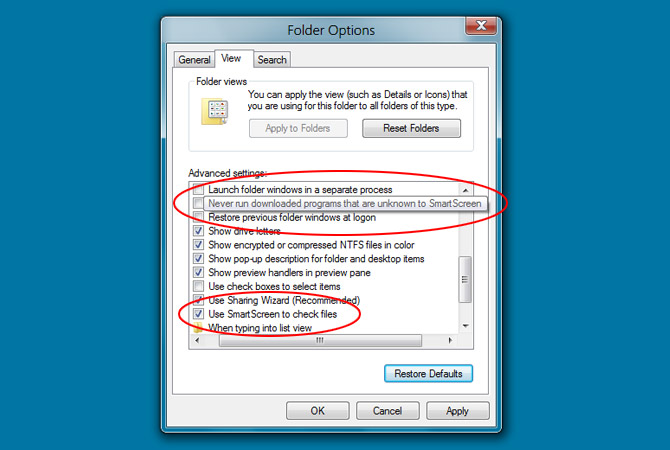
In Internet Explorer (IE), we already familiar with the SmartScreen filter which contains a list of known malicious links and compares the user visited links with the list. If a match is found, it warns the user. It seems Microsoft is going to implement this in Windows 8 too.

Thursday, April 7, 2011

Windows 8: New Aero Auto Colorization Feature


From Paul Thurrott SuperWinSite and Rafeal Rivera, they had discovered Aero Auto Colorization feature in Windows 8. The new feature will automatically change color of Aero elements, like the Start Menu, Windows Explorer windows, and the taskbar based on the desktop wallpaper.

How to Remove and Disable mdm.exe

In XP system, and probably Vista and 7, you might find a process called 'mdm.exe'. It take at least 800kb to 1MB of RAM, and here I am going to tell you what is mdm.exe and how to disable it.

Wednesday, April 6, 2011

Guide to Turning Off Windows XP Unnecessary Eye Candy


In Windows XP, lots of eye candy that we don't really need is turn on by default that take in resources and slowing it down. Here is a guide to disable them and and what you may not disable if you want to keep some of them while still saving system resources.

Ribbon UI Revealed & Other Improvement in Windows Explorer


Ribbon UI in different views
Ribbon UI are used in Windows 7 Wordpad, Paint and Microsoft Office 2007 and 2010. Now looks like Microsoft is going to implement this on Windows 8 Explorer shell.

Windows 8: A Glimpse of Immersive GUI in Internet Explorer


Last month saw the rampaging leaks on the development of Windows 8. And now Rafael Rivera and Paul Thurrott tell us what is to be a glimpse of one of Windows 8 multiple UI , the Immersive UI in Internet Explorer on Windows 8 build.

Tuesday, April 5, 2011

Collection of Possible Ways to Put Your Name in XP

Monday, April 4, 2011

6 Days Giveaway MacX iPhone Mounter

MacX iPhone Mounter is a software to transfer video, music, phone data, etc from iPhone to a Mac computer and mount iOS devices as hard drives to backup data.

You can convert files from your device into various popular formats such as M4V, MP4, MOV, MPEG-4, H.264, AAC, MP3, WAV, AIFF, M4A. The software is obviously works only for Mac OS 10.5-10.6


The software usually costs $29.95 but you can get it for free and unlimited download until 10 April 2011.
MacX iPhone Mounter Giveaway


Product keys are also included at the page. Note: No free update or technical support is provided.

[This GiveAway Is No Longer Valid]

Saturday, April 2, 2011

Show Custom Text on Windows Desktop Context Menu

Do you know what context menu is? Just right click on anything on your desktop, a white box with text come out. That's context menu, and here I am going to show you how to put custom text on desktop context menu.

Change Windows XP Start Button Text

Here I am going to show a simple way to customize Windows XP Start Button text using Resource Hacker and WFP Patcher. Now lets WOW your cousins mouth...

Customize Windows Welcome Screen Text

Anyone who use Windows XP will definitely saw the boring Welcome Screen. For anyone who wish to customize the Welcome Screen, changing the Welcome text will  be a good start...

Friday, April 1, 2011

Get Windows 8 Wallpaper from Build Milestone 3

The wallpaper is surprisingly looks good on screen...
The latest Windows 8 (Milestone3) come with a new minimal wallpaper. Surprisingly the wallpaper looks great and cool on screen ;-). For more explanantion: ZdNet

Bookmark and Share
Twitter Delicious Facebook Digg Stumbleupon Favorites More