Add Custome OEM Text and Image in System Properties

OEM stands for Original Equipment Manufacturer. You can add custome text and your own image by following some simple steps.

10 Software to Customize and Revamped Your XP

Ever felt your XP is to dull? This 10 software will surely REVAMPED your XP. Dull XP will never be in your live anymore.

Collection of Possible Ways to Put Your Name On XP

I have post many articles about putting custom text in XP and I compile them in one page, try one or preferably all of them!

16 Great and Free Vector and Image Editing Software

Whether you are finding and advanced Photoshop-like alternative or just finding a simple photo editor with advanced tools, this list might help you find one you like.

How to Creat Your Own Message Box in XP, Vista and Se7en.

Wouldn't it be fun to have a message box greets you on start-up or how about pranking you friend with a fake virus alert?

Monday, May 16, 2011

How To Create a Shortcut To Restart Explorer.exe

If we want to restart explorer, we just kill explorer.exe in Task Manager and restart it again by entering its name in New Task. But wouldn’t it be easier if we had a shortcut to do this? Luckily,  we can do this by creating a batch file.

How to Create

1.Open Notepad. You can open it by Start->Run->(type & enter) notepad.exe

2.Now copy paste the following code into notepad.

@ECHO OFF
echo.
echo.
echo ==========================================
echo Simple Script to Restart Windows Explorer
echo.
echo PC Tricks@2011
echo ==========================================
echo.
echo.
echo STEP 1: Closing Explorer . . .
echo.
TASKKILL /F /IM explorer.exe
echo.
echo.
echo STEP 2: Starting Explorer . . .
start explorer.exe
echo.
echo SUCCESS: Explorer is running.
echo.
echo.
PAUSE

3.Now in Notepad open File->Save As

4.Name the file anything just remember to set the file type to ‘All Files’ and the most importantly add

.bat

behind the file name or it won’t work.

5.Click on the shortcut and it will start restarting explorer.exe

Change The Icon (Optional)

1.If you want, you can change the shortcut icon by

Right clicking on it-> Properties->Shortcut. Below the shortcut tab, click ‘Change Icon’ button.

2.Now choose any of the icon available or you can create one yourself. Just make the image small, convert it to ico. Then repeat step 1 and browse to the icon you make. Set it as the shortcut icon.

Place to Put the Shortcut For Easy Access

1.Quick Launch

2.Desktop

3.Put the Shortcut in a Toolbar

4.Start Menu

Sunday, May 15, 2011

How To Unlock All Angry Bird Game Levels

Its just less then one day after released in Chrome Web Store, there already a hack to the popular game, Angry Bird.

To unlock all Angry Bird Game Levels:

1.Open the game if you haven’t and wait for it to fully loading.

2.Paste the code below into the addressbar then press enter …

javascript: var i = 0; while (i<=69) { localStorage.setItem('level_star_'+i,'3'); i++; } window.location.reload();

3.Now check all of the levels. They should be unlocked and ready to play!

To revert back just:

Paste the following code into the addressbar like the first code and press enter

javascript: var i = 0; while (i<=69) { localStorage.setItem(‘level_star_’+i,’-1′); i++; } window.location.reload();

Enjoy the game!

SRWare Iron The Google Chrome Alternative For Total Privacy

SRWare is a Chromium based browser and is free and open source. Chrome, Rockmelt, ChromePlus are also build on Chromium frame. SRWare Iron is said to be the solution to Google Chrome controversy over its ‘built in user browsing habit spyware’.

Below is a table which differentiate Chrome and SRWare.

  SRWare Iron Google Chrome
Automatic Update N/A Available
Privacy Available N/A
Speed Same (not tested) Same (not tested)
Safety Partialy Available Partially Available
Extensions Available (might experience incompatibility) Available
In-Build Advertising Blocker Available N/A (and will never do, EVER)
Portable Version Available N/A
Total Mark SRWare (5  1/2) Chrome (3  1/2)

Explanation

1.SRWare must be update manually and what’s more you have to download the full installer. In Chrome, it is taken care of automatically and only require small donwload.

2.Privacy is the reason why SRWare is built. Chrome as I told you before has legal spyware tracking you browsing habit, history, cookies and even possible your computer file index.

3.Speed is the same for both of this browser as both were built on the Chromium framework. Although I have not scientifically test it, SRWare feel a lot faster than Chrome.

4.Both browser has some flaw of its own. SRWare were not updated as frequent as Chrome and they did not have the large resources to do that as Google have. So SRWare security vulnerabilities will be patch much slower than Chrome. For Chrome, well it is the prime target for today’s hacker. In fact, Chrome is so easy to hack, there’s even a competition for it. So, it is very much the same. Chrome also have some security fail history. Just like a rouge ads in one of British bank pages, Google Chrome were ‘Owned’ by it and some other browser too but Firefox, not even a binary code edited.

5.Chrome extensions is compatible with SRWare but there will be a slight chance that an extensions are written specifically for Chrome and cannot work on SRWare.

6.Ad-Blocking is something Chrome user begging for years. But Google will never allow it since ads is their ‘food source’. No ads, no business, no money. Google Chrome does have AdBlock extensions and has been a top add-ons in Google Webstore. SRWare on the other hand have in built adblocker. You only need to adjust its adblock.ini file and done. But I wish there will be an easier method with GUI.

7.SRWare has its own portable version. Google Chrome, none at the moment.

This table is not fair in my opinion…(you think so?)

The table looks fair too me as all of the additional feature above is actually what Chrome users have been asking again and again. It’s just Google stubborn to add them.

Is SRWare Iron to be trust or just another big ‘G’?

Some people suggest that SRWare might be a scam and is collecting its own user browsing habit or similar act. And my imagination even tell me that this might be Google own fake company so that Chrome user who turn away will use this instead. Hope not or I’ll never trust any software like this.

Conclusion

SRWare Iron is a great browser and has some special feature of its own. For example, if you want a portable version of Chrome, you can give SRWare a try with no speed loss. Also, if you a privacy paranoid, SRWare Iron is a not proved but trusted by a growing community around the world.

Saturday, May 14, 2011

Google Music Beta Invitation Only Version Launched

Google Music is a new ‘innovation’ by Google which lets you upload your personal music collection to be listen and enjoy anywhere anytime in world, keep everything sync and forget the hassle of cable and files.

You can access your personal music collection at home or anywhere. Listen them from the web or enabled device with the Music app from Android Market. What’s more, even if you are online you can still access your song. Your recently played song will be automatically available offline. There’s also an option to specifically choose which albums, artists, and playlists you want to available when not online.

Spend more time listening to music and less time organizing them. Once you music is online its always available. Playlists are automatically kept in sync so no worry about cables, file transfers or running out of storage spaces.

Upload your file to a single library even if it’s scattered across multiple computers. You can upload music files from any folder or add iTunes library and all of your playlists.

Create custom playlists with a few clicks. Or use Instant Mix feature to automatically build new playlists of songs from you collection that go great together.  All the changes and playlists you create are automatically available everywhere your music is.

Unfortunately for all of us, Google Music Beta invitation is only available for United States citizens at the moment.

Google Music Beta

How to Re-enable Registry Editor

If you were prompt by Windows that you are not permitted to access Registry Editor, its mean the regedit has been disabled. It may be disabled by your administrator or if you are the only user, disabled by malware who don’t want you to remove them by  regedit.

Follow the following steps…

1. Go to Start -> Run and type gpedit.msc. This will open Group Policy Windows.

2. Navigate to User Configuration -> Administrative Templates –> System. In the right side pane, double click –> Prevent access to registry editing tool.

3. Select "Disabled" under Setting Tab and Click Apply and then OK.

4. Now try to open Registry Edit & it will appear.

Saturday, May 7, 2011

10 Software to Customize and Make Windows XP Looks Cool

Windows XP are not arguably the second most greatest OS created by Microsoft other then Windows 7. But haven't you felt boring to see a sea of blue colours or silver on your desktop? If you got the RAM like maybe 3GB++ (2GB is fine too) then you can change that boringness into something COOL using these 10 software that will REVAMPED your XP.

All you need is:-                
  • Windows XP Repair CD  (or whatever you called it)  (optional, just in case you encounter some trouble...)
  • 1.5GB-3GB++ of RAM(for optimal performance with optimal prettyness)
  • A averagely powerful computer (Atom Processors is not recommended)
  • Some hard disk space

If you have all the things up here, you are fully compatible to apply these cool softwares. But if you don't, its not wrong trying. Try one or if you want ALL of the software below. Download page link are on the softwares title. These software are not ranked, I write them randomly.

Monday, May 2, 2011

Use Windows 8 M3 Starter Kit to Change XP to Windows 8

Windows 8 are now under development as we know it. Lots of screenshot and details are leaked. You can find them in Windows 8 section.

Have you ever  dream of having all of that cool Windows 8 eye candy on your old reliable XP? You're in good luck because PeterRollar@DA has created a Windows 8 M3 Starter Kit just for that reason. 
 

You will also need a theme that has Windows 8 look for the kit to sync well. You can use any of the Windows 7 theme here made by Vishal Gupta(MPV)

Cool Windows 7 and Vista Themes for Windows XP

And a software called Styler which can be download here:

Download link

The pack will give us the following things:


  • Windows 8 Border
  • Styler skin Windows 8 Ribbon
  • Windows 8 Clock
  • Windows 8 Start Menu
  • Right Side Common Tasks Pane shellstyle.dll

How to Install and Use Styler Skin

Styler is an eye candy software that can add custom toolbar skin, change themes, apply drop shadows and more. But many people don't know how to install Styler skins. It's actually very easy.

Open C:/Program Files/Styler/TB/Styler/Skins. 
Copy-Paste the skin you download in it. Restart Styler if you have it on now and you should see your toolbar ready to be use.

If you installed Styler on another partition, change C: to the other drive letter. Also for optimum prettyness, disable menubar in Styler, right click on Styler icon in taskbar, click Toolbar tab and select Hide Menubar in Explorer.

Saturday, April 30, 2011

Download Windows 8 M3 Metro UI Logon Screen for XP

In the latest Windows 8 M3 build, the logon screen is different from Windows 7 only slightly. The background is changed and the button are metro style and cool ;)

PeterRollar @ DA has recreated it for Windows XP.

The only thing missing in it is the time and date feature which is impossible to recreate in XP.
Download the Windows 8 Metro UI Logon Screen

How to Use
Method 1
First extract the file you downloaded. Then, you will find 3 file, a software called Replacer, a wallpaper, and the logonui.exe file. Open Replacer. Now go to C:Windows\System32 and find a file named logonui.exe. Copy the file and place it in somewhere safe as backup. Now, drag the logonui.exe file in system32 into Replacer window. Then drag the logonui.exe file that you've extracted into Replacer window. The rest should be easily figured. Logoff and your new logon screen is there.


Method 2
You can use TuneUp Utilities

Google Chrome Stable and Beta Update [11.0.696.60]

Google has update its browser Stable and Beta channel to 11.0.696.60. This version fix one bug which make it trough  version 11.0.696.57.

REGRESSION: Windows painting issue while switching Chrome 11 window with overlapped app.

Download
Google Chrome Standalone Offline Installer 
Google Chrome Online Installer

Sunday, April 24, 2011

4 RocketDock Tips and Tricks For New Users

Rocketdock is a cool docking software made by Punk Software. They claim it to be the greatest software made. Ever. I don't really agree but they do create a wonderful docking software. And with this few cool tricks, you can say Rocketdock maybe is the best software of its kind out there... P/s: The trick here is primarily for XP users only.


  • Accidental Aero Effects in XP
  • Hide Taskbar On the Go Permanently
  • Put Shutdown and Restart Shortcut on Rocketdock
  • Use Stack Docklet To Remove Taskbar Necessity Even More

Free Full Version Five Ashampoo Software Easter Giveaways Worth $104.95

As the Easter Festival, Ashampoo kindly released 5 Free Full Version of its software. The software are:

  • Ashampoo Anti-Malware
  • Ashampoo Slideshow Studio Elements
  • Ashampoo HDD-Control
  • Ashampoo Internet Accelerator 3
  • Ashampoo MyAutoplay Menu
The product are absolutely Free, Full Version without any obligation. Although there will still be trial message but the software are not trial, they're completely full version!

Go to The Promotional Page and click the 'Get Downloads now' button. If the coupon code are not in the box, write 'easteregg'. And if you don't have the time to download this, take your time since Ashampoo giveaways usually hold for a VERY long time..

How to Reactivate A Genuine Windows 7 That Became Pirated

You wake up in the morning, boot your computer and suddenly you are greeted with a box saying to activate your Windows 7, some text saying your Windows 7 is not genuine and your wallpaper is black-pure black. This thing happen to many Windows 7 users even Windows 7 SP1 RC users. Now that is strange since you buy Windows 7 legally as you remember so why this happen and how to fix this?  Luckily there's some ways to fix this without reinstall your OS. Here are How to Reactivate A Genuine Windows 7 That Became Pirated.

Saturday, April 23, 2011

Show Your Name Beside Windows Taskbar Clock

Seeing is believing. Learn how to edit the AM/PM symbols and change it into any custom text. No registry editing, no bloat software, in fact we will be using one of Control Panel tool.

Friday, April 22, 2011

Microsoft 'Windows XP End of Support Countdown' Sidebar Gadget...Useless But Useful for Microsoft

Microsoft will end support on XP in the year 2014. And recently, Microsoft released what to be a countdown timer sidebar gadgets for Vista and 7 users. 

Now almost anyone would think that it is an absolutely a ridiculous gadgets to put on the desktop. What's more, they released it for Vista and 7 users, which I think don't care what will happen to XP. 

Yet, actually it may be useless to us but USEFUL for Microsoft...Why? For something that Microsoft really are focusing on now...Making Everyone Windows Genuine, Get Rid Old Timer and getting IE6 out!

First I explain why Making Everyone Windows Genuine. Well an experience users that use Non-Genuine Windows OS may have experience the no wallpaper and black desktop and annoying box telling you that you have been counterfeit. Before installing, the gadget installer will check whether your OS is genuine or not.

So for anyone who knew he/she have a Non Genuine Vista or 7 and have no experience on this would fall for the trap. And it is HARD to get rid off. For a non tech savvy who got the money, he may buy a Genuine OS after getting this and, BOOM..more cash flowing in to Bill Gates. But with a quick search in Google, you'll find the solution.

The second reason, is to Get Rid of Old Timer, Microsoft are getting lazy on maintaining XP so they use the gadget so people like me will write about it and tell when will XP support ends. Thats year 2014 folks! Moreover, so people like me tell what will happen if Microsoft ends support on XP. FYI, there will be no updates, even critical security updates and no cool software support for XP too. Visual Studio will be likely not support XP. MSE, Windows Live have possibilities too.

Yet you can still buy, install and use XP. Think, a worried business man/woman worries about his/her PC security and buy Windows 7 and BOOM, another XP user is get rid off and more money flouring into Bill Gates pocket.

Lastly, to getting IE6 out! This old browser has been bothering Microsoft for years. Not only it makes web developers working hard to make their work compatible with IE6, IE6 is also hard to protect from todays hacker and malware. And also since IE6 is only available to XP and the OS before it, getting rid of XP mean getting rid of IE6! With market shares still high, small action like this is necessary.

So now you have it, reasons why this ridiculous gadget is made. Sorry for the bad grammar, ask me in the comment if you don't understand something.  

And for XP users, pray that Microsoft will at least make Service Pack 4!

Wednesday, April 20, 2011

Windows 8: New Modern and Advanced Task Manager UI Revealed

A new redesigned task manager UI has been revealed by WinRumors. The above screenshot shows The Advanced Task Manager and Modern Windows Task Manager opened.

Sunday, April 17, 2011

Free Full Version TuneUp Utilities 2010 Giveaway

TuneUp Utilities is known as one of the best payed optimization suite. It has many useful feature and can apply many system tweaks for increased system performance and customize Windows as you like. 

And what's more, TuneUp in partnership with ComputerShopper is releasing FREE Full Version TuneUp Utilities 2010 for everyone!

Go to the Promotional Page for TuneUp Utilities 2010 and enter your email address and fill out the captcha code. Then it will send an email containing a link to a page where your key and download link will be shown. 

If you want, you can always try the key that I get rather than giving your email, see if it works...
0AAJTM-PCJNEA-38HVDC-49D000-34RDA4-965PDK

Saturday, April 16, 2011

Internet Explorer 10 Support Windows 7 & 8, Vista and XP Drop Out!

From the recently released IE 10 preview platform, it is clear that Microsoft will not and looks like will never again support XP. Sadly but not surprisingly, Vista is drop out too. Internet Explorer will only support and only support Win7 & 8.

Try installing IE 10 Platform Preview on a Vista or XP you will get a frustrating message...
Windows Internet Explorer Platform Preview does not support any operating system earlier than Windows 7.

Even in the release note it is clearly said...
The Internet Explorer Platform Preview requires Windows 7 (x86 or x64) Operating System.

Of course Windows 8 is not mention here since it's not yet released.

What do you think...is is this a right decision from Microsoft?

Friday, April 15, 2011

Top 10 Unnoficial Windows 8 Wallpaper from DeviantART

Definitely looks cool...my favorite
AskVG.com  has compiled the Top 10 Unnoficial Windows 8 Wallpaper from DeviantART. If you want to feel the early taste of using Windows 8, this wallpaper will definitely help you...

Windows 8: Will Provide In-Build Direct ISO Mounting Capabilities

In-build ISO mounting capabilities is definitely one of the best decision made by Microsoft.
Today, more and more software are delivered electronically. So its a good decision for Microsoft to put an in-build ISO mounting capabilities so we can access ISO contents without having to first extract them or burn them to disc or use Daemon tools to do this.

Sunday, April 10, 2011

Donwload Windows 7 Icon Tweaker Pack for Windows XP


Recently I found a Windows 7 Icon Tweaker pack from dksZone.net. After applying it, I found it to be the most original one of all. And what's more, it has all Windows 7 cursors!

Please note you need Icon Tweaker to use this icon pack which is free.

Download it from this direct link Download Windows 7 icons for XP OR
visit the original page Windows 7 Icon Pack for XP for more info.

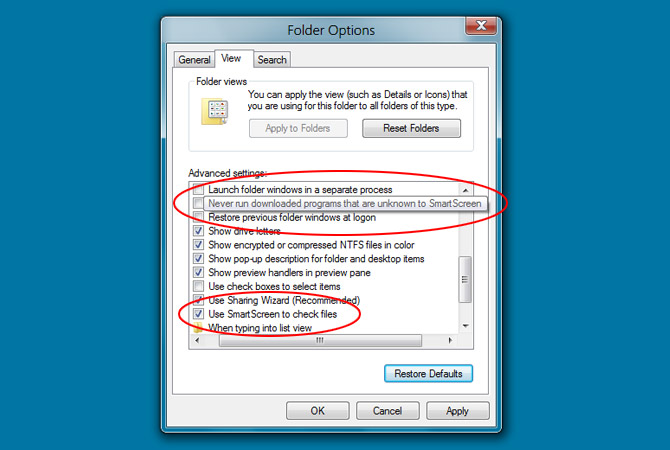
Windows 8: Feature SmartScreen File Checking Like IE

And look..windows title at the middle now!


In Internet Explorer (IE), we already familiar with the SmartScreen filter which contains a list of known malicious links and compares the user visited links with the list. If a match is found, it warns the user. It seems Microsoft is going to implement this in Windows 8 too.

Thursday, April 7, 2011

Windows 8: New Aero Auto Colorization Feature


From Paul Thurrott SuperWinSite and Rafeal Rivera, they had discovered Aero Auto Colorization feature in Windows 8. The new feature will automatically change color of Aero elements, like the Start Menu, Windows Explorer windows, and the taskbar based on the desktop wallpaper.

How to Remove and Disable mdm.exe

In XP system, and probably Vista and 7, you might find a process called 'mdm.exe'. It take at least 800kb to 1MB of RAM, and here I am going to tell you what is mdm.exe and how to disable it.

Wednesday, April 6, 2011

Guide to Turning Off Windows XP Unnecessary Eye Candy


In Windows XP, lots of eye candy that we don't really need is turn on by default that take in resources and slowing it down. Here is a guide to disable them and and what you may not disable if you want to keep some of them while still saving system resources.

Ribbon UI Revealed & Other Improvement in Windows Explorer


Ribbon UI in different views
Ribbon UI are used in Windows 7 Wordpad, Paint and Microsoft Office 2007 and 2010. Now looks like Microsoft is going to implement this on Windows 8 Explorer shell.

Windows 8: A Glimpse of Immersive GUI in Internet Explorer


Last month saw the rampaging leaks on the development of Windows 8. And now Rafael Rivera and Paul Thurrott tell us what is to be a glimpse of one of Windows 8 multiple UI , the Immersive UI in Internet Explorer on Windows 8 build.

Tuesday, April 5, 2011

Collection of Possible Ways to Put Your Name in XP

Monday, April 4, 2011

6 Days Giveaway MacX iPhone Mounter

MacX iPhone Mounter is a software to transfer video, music, phone data, etc from iPhone to a Mac computer and mount iOS devices as hard drives to backup data.

You can convert files from your device into various popular formats such as M4V, MP4, MOV, MPEG-4, H.264, AAC, MP3, WAV, AIFF, M4A. The software is obviously works only for Mac OS 10.5-10.6


The software usually costs $29.95 but you can get it for free and unlimited download until 10 April 2011.
MacX iPhone Mounter Giveaway


Product keys are also included at the page. Note: No free update or technical support is provided.

[This GiveAway Is No Longer Valid]

Saturday, April 2, 2011

Show Custom Text on Windows Desktop Context Menu

Do you know what context menu is? Just right click on anything on your desktop, a white box with text come out. That's context menu, and here I am going to show you how to put custom text on desktop context menu.

Change Windows XP Start Button Text

Here I am going to show a simple way to customize Windows XP Start Button text using Resource Hacker and WFP Patcher. Now lets WOW your cousins mouth...

Customize Windows Welcome Screen Text

Anyone who use Windows XP will definitely saw the boring Welcome Screen. For anyone who wish to customize the Welcome Screen, changing the Welcome text will  be a good start...

Friday, April 1, 2011

Get Windows 8 Wallpaper from Build Milestone 3

The wallpaper is surprisingly looks good on screen...
The latest Windows 8 (Milestone3) come with a new minimal wallpaper. Surprisingly the wallpaper looks great and cool on screen ;-). For more explanantion: ZdNet

Thursday, March 31, 2011

Enjoy PCT 2011 in Blogger New Dynamic Views

In according to Blogger preview released of their 5 new Dynamic View template and since this blog is powered by Blogger, I make 5 link to 5 different template so that you don't have too put /view manually. Enjoy them and I recommended Sidebar or Timeslide as it is fast loading and suitable for reading, also there aren't many image used in most of my post and other template like Mosaic depends excessively on image. Wow, I feel like I am changing my blog to Blogging tips here lol, well enjoy them!

Sidebar
Flipcard
Mosaic
Snapshot
Timeslide

Enjoy!!!

5 Useful Windows Explorer Tricks

Everyone knows how to use Windows Explorer. But most people didn't now its full feature and potential...the tricks below will help you use it much faster, practical and some of this is not known to much of people...

Sunday, March 27, 2011

3 Must Have Windows Explorer Extensions for Windows

Windows Explorer in Windows is good but for anybody who want extra features, this extensions can become handy especially for XP users. Fortunately, this extensions works with Vista and 7 too. The extensions were talking about are Filerfrog, QTTabbar and QTAddressbar

Friday, March 25, 2011

Google Chrome Secret Gold Icon Unveiled


All people know Google traditional icon colour, but do you know until recent Dev versions, Google had started to put a secret gold Google Chrome icon in the installation!

Thursday, March 24, 2011

Google Chrome New Icon But WHY???

Many people might have realized that the Google Chrome icon has change into a simpler, no 3D, no gloss, just Blah. Well the icon look awesome on webpage but on computer desktop, its dull. So you probably wonder....WHY this?
To answer this..lets see Google explanation on their blog....

List of All Firefox 4 Related Post

This week post is mostly all about Firefox 4. So here I list every Firefox 4 related post by their categories.

There are many animation and feature not enabled by default in Firefox. These post can help you enabled them.
Enable Ctrl+Tab Thumbnails Previews in Firefox 4 & 3.6
Enable Option|Preferences Animation in Firefox 3.6 & 4.0 
Enable All Tabs Previews In Firefox 4

There is also a disabled feature in Firefox 4 where in earlier version, Firefox will prompt you to save tabs and quit if you close  the window with multiple tabs opened. This post can help you re-enabled it.
Re-enable 'Save Tabs and Quits' Features in Firefox 4

Additional Tips and Secret
Have Multiple Homepage in Firefox (ALL Version)
22 Firefox About:pages Complete List

Enjoy!

Re-Enable Firefox 'Save & Quit' Feature in Firefox 4.0

In Firefox 4, the 'Save& Quit' feature is disable for an unknown reasons. In earlier versions, if you opened more than one tabs in Firefox and clicked on Close button, it used to show a dialog box to save your tabs and quit the window. But we can re-enable this using about:config.

Enable Ctrl+Tab Thumbnails Previews in Firefox 4 & 3.6

This feature is not enable by default and this new "Ctrl+Tab" preview thumbnails list similar to Windows Vista and 7 "Alt+Tab" preview thumbnails. If you are attracted to this feature, you can follow the following steps.

Enable Option|Preferences Animation in Firefox 3.6 & 4.0

Do you know there are a sweet animation where the box window length will increase/decrease according to the number of options available in the current tab with transition effect!

Disable NewTabs, Panorama, Toolbar Full Screen Animation in Firefox 4

Mozilla has put tons of effects on its new version of Firefox 4. But some people(like me) find some of it very annoying. But with a little search in the awesome about:config, I've found the solution.

Enable All Tabs Previews In Firefox 4

Mozilla has work hard on their new Firefox 4. Here I am going to show you how to enable Firefox All Tabs Previews which is not enabled by default. If you want to see this, follow the following instruction.

Tuesday, March 22, 2011

Confuse Windows XP You Running SP3 While Still Running SP2

Many people did not install SP3 from SP2 for a number of reasons. But much of Windows XP crucial update patch is available only for Service Pack 3. But with a simple registry tweak you can confuse Windows that you are running SP3 while still running SP2. Also some popular games can only be installed on SP3 but applying this trick will make it installable and still playable on SP2.

Sunday, March 20, 2011

22 Firefox About: Pages Complete List

This is the complete Firefox about: page list. Yep its the real deal, no more searching, its all here!

Have Multiple Homepage in Firefox (All VERSION)

Have Multiple Homepage just like IE in Firefox using a simple trick...

Saturday, March 19, 2011

Smart Defrag 2.0 A Perfect Free Defragger

Iobit has now released its new version of Smart Defrag 2.0. This time with new feature and improvement.

  • Boot Time Defrag Technology
  • Improved defrag and optimize engine
  • Improved auto-defrag function
  • New interface 
In the previous version, Smart Defrag has a an automatic defrag feature which make it stand out from other freeware. And now with the long awaited boot time defrag, Smart Defrag is arguably the best defrag among the freeware.

Smart Defrag can
  • Defrag multiple partition at the same time
  • Boot time defrag 
  • Automatically defrag hard drive when the computer is idle
  • Has normal defrag(fastest), fast optimize, and full optimize(slowest) feature
  • Low memory consumption(when defragging just take 5mb!)
  • Has the optiuon to shutdown, sleep or hibernate after defragging 
Windows XP and Vista will benefit from this software as they did not defrag hard drive automatically like Windows 7. In short, this is the best free defrag ever and a must have!

Download page: Smart Defrag 2.0 CNET Download

Friday, March 18, 2011

Change Logon Screen Easily With Stardock LogonStudio

Are you bored with your current logon screen? You can Change Logon Screen Easily With Stardock LogonStudio easily.


Just download Stardock Logon Studio and go to wincustomize.com for more beautiful logon screen.

P/s: For Vista and 7, download from Download.com. XP users download from Stardock itself. The version at Download.com will not work on XP. And also after downloading custom logon screen, put them in Logon Studio program files for easy uninstall. And always set the logon screen to default before removing the program.

Download page: http://www.stardock.com/products/logonstudio/downloads.asp
Wincustomize: http://www.wincustomize.com/
VistaUltimateLogon(my favorite): http://www.wincustomize.com/explore/logonstudio_xp/9331

Thursday, March 17, 2011

9/11 Attack Is Actually Predicted by Computer Literally

We all knew the tragic act that happen at 9/11 but do you know it actually predicted by computer and correctly. Well not really predicted but literally....

Wednesday, March 16, 2011

16 Great and Free Vector & Image Editing Software

Here i have compiled  16 Great and Free Vector & Image Editing Software just for you. They are all great programs but if want an alternatives to Photoshop, try GIMP, hard to learn but once mastered, you can create image as great as Photoshop. Paint.NET is also another worthshot.

Monday, February 28, 2011

How Can This Happen????Blogger Address become Bible Webpage!

Try this. Copy paste this to your addressbar http://pctricks2011.blogspot.com/. What happen? It goes to PC Tricks@2011 homepage right? Wait, don't closed the page yet! Now copy paste this to your addressbar http://pctricks2011.blogpsot.com/. You can try this with any blogger website eg: http://example.blogpsot.com

What happen? It redirect you to a Bible learning website isn't it?

Well yes if you are not Christian, you will be kinda disturbed by this. I am a Muslim and I feel a little shocked after seeing this. I also have a Hindu friend and he also felt disturbed by this. But it isn't what I feel weird and I did not feel mad since the Bible website does named blogpsot.com.Just search it.

What intriguing me here is that wasn't that we put a full address-> http://pctricks2011.blogpsot.com/???? Even if we change blogspot to blogpsot it shouldn't redirect to blogpsot.com??? 

Whatever but IMO this is a very nice exploitation of the addressbar. Maybe the addressbar interpreted wrongly and read http://pctricks2011.blogpsot.com/ as blogpsot.com. Wish found this exploitation sooner than the webmaster of the Bible site. I could get millions of hits everyday, I mean we could mistype blogspot to blogpsot easily.

WHAT EVEN STRANGER IS THAT THE SITE ADDRESS DID NOT CHANGE TO BLOGPSOT.COM->IT STAYS http://pctricks2011.blogpsot.com/.!!!!!

Is it possible that Google give special privileges to this website...Well I WANT IT TOO!

[Original]

How to Put 'Pin to Start Menu' Option in Context Menu

Haven't you think how to pin folders to Start Menu? By pinning and item in Start menu, you can open a program easily and quickly.  Unfortunately by default, Windows XP can't pinned folders to Start Menu, but you can enable this using some simple registry keys. Remember to backup the whole registry just in case something get weird.

Saturday, February 26, 2011

8 Things You Should Do on Your Computer Every Week

Here are 8 Things You Should Do On Your Computer Every Week. Computer is an important assets today and I can say that at least 3 in 10 house you see has computer in it. But, even so they use it everyday, people still doesn't know how to maintain and protect their computer well to escape from computer repairer or sold.

Wednesday, February 23, 2011

How to Defrag Pagefile Without 3rd Party Software & MFT

To Defrag Pagefile(without using 3rd Party Software)
P/s: Smart Defrag 'Boot Time Defrag' feature can defragment pagefile too. The step below is only if you want to use Microsoft own built in defragmenter. 

Press Windows keys+Pause|Break at the same time. The System Properties will pop out. Go to the Advanced tab and click the Settings button under the Performance category. Another window will pop out, go to the Advanced tab and click Change under the Virtual Memory category. Another Window will pop out. Now click on the partition label where your pagefile is. Below you will see some settings. Set it to No Paging Files. Click Set. Now click to another partition and set some paging file to it. It is advisable to set the same amount of number on the maximum and minimum box so that it will not expand or contract and fragmented. Also set the paging files to 1.5x the amount of RAM you have. If you got 1GB, set it to  1.5GB to 2GB of pagefile although you can set it higher than that. 

Now the first part is done. Restart your PC. Open any of your defragmenting softwares which you can find on the internet or use Windows Disk Defragmenter. Defrag the original paging file partition. After it is done restart,set the paging file to the original partition and remove the paging file on the other paging file. 

To Defrag MFT(Master File Table)
MFT cannot be defragmented after booting the Windows. It can only be defragmented during booting. I had use many defrag with boot time feature and recommend IOBit new beta version of smart defrag 2.0. It comes with a boot time defrag feature that is not available in the old stable version 1.5.

Download page: http://www.iobit.com/iobitsmartdefrag.html

After downloading and install the software, open it and turn on the boot time defragmentation feature. Restart or shutdown and start it back and it will defrag during the booting process. This can take a while so be patient. Remember to choose the 'only next boot' or you will find yourself have too push the N key everytime you turn your PC on. Turn it back on if you want to defrag the MFT again.

P/s: Smart Defrag Boot Time Defrag feature can defragment pagefile too. The step for pagefile above is only if you want to use Microsoft own built in defragmenter.

Microsoft did encouraged you to defrag MFT and pagefile.sys to optimize performance and to prevent system crashes or failures.

[Original]

Monday, February 21, 2011

How to Remove Shortcut Arrow in XP

Sometimes I feel that shortcut icons is very ugly and annoying in Windows XP. I bet you felt like that too. Well I found the solution and its very safe since it is a built in feature in Microsoft own power toys.

Sunday, February 20, 2011

How to Remove ctfmon.exe

If you open Task Manager, i will 100% sure you will found this process--ctfmon.exe. It takes roughly 3-8mb of RAM and if you disable it, it will start itself back again. It isn't a keylogger, viruses or any other malware. This service is for advanced text, handwriting and speech recognition. So, if you think you don't need this, you can always disable this, and its pretty easy to reenable too...

Thursday, February 17, 2011

How to Make Windows XP (All Version) Genuine Forever

You don't need virus software to make Windows XP Genuine, all we need is Notepad and copy paste...

Tuesday, February 15, 2011

Add Custom OEM Text and Image in Windows System Properties

Well what is OEM and Windows System Properties? OEM is short form for Original Equipment Manufacturer. You can see Windows System Properties by pressing Windows button+Pause/Break on your keyboard. Try it and you will see its pretty boring to look. Actually, you can add some text like your company name etc and custom image!

3 Settings You Should Apply to Recycle Bin

You can set how Recycle Bin works. Like bypassing confirmation box, bypassing Recycle Bin, set the amount of hard disk use by Recycle Bin to store files

Sunday, February 13, 2011

Cool Windows 7 and Vista Like Themes For XP

Want to change the look of your XP desktop a little bit 7? Use themes from www.askvg.com which has one of the most near perfectly design 7 and Vista themes for XP...page links are below...

SevenVG Black RTM with Normal Thin Taskbar
SevenVG Black RTM Superbar
SevenVG RTM with Normal Thin Taskbar
SevenVG RTM Superbar
VistaVG Blue Refresh 
VistaVG Black
VistaVG Ultimate 

If you have problems using this themes, it might because you haven't apply the Universal Theme Patcher. Universal Theme Patcher enable you to use 3rd party themes(themes that Microsoft did not build). It save to run although there are some rare cases of bad luck so to be extra safe..run the program in Safe Mode and make restore point first.

Page links: http://www.askvg.com/how-to-install-use-custom-3rd-party-themes-in-windows-xp-vista-and-7/

You will see other softwares which do similar job on the page as well.

I use the SevenVG Black RTM with Normal Thin Taskbar with my own baclground.

Transform Windows XP into Windows 7 without using Customization Pack

Credit: www.askvg.com

Windows 7
 provides lots of new features along with a newly designed interface. It looks very similar to Windows Vista but there are many GUI changes like redesigned taskbar, Explorer, new boot screen and login screen, etc. To get this in XP, just follow the guide and you'll be shock how Se7en your XP is.
 Go to Transform Windows XP into Windows 7 without using Customization Pack article by Mr.Vista or Vishal Gupta at his sites.

The guide include on adding 7:

  • Windows Theme or Visual Style
  • Icons
  • Boot Screen
  • Login Screen or Welcome Screen
  • Cursors
  • Taskbar
  • Wallpaper
  • Sidebar
  • Progress Dialog Box
  • Shutdown / Log off Dialog Box
  • About Windows Box
  • System Properties Dialog Box
  • Volume Control Window
  • "Aero Shake", "Aero Snap", "Aero Peek", "Calculator" and "Paint"
TO XP!

How to Create Custom Shutdown, Restart, Log off Shortcut at Desktop

All in one guide on how to make shutdown, restart, and log off shortcut on your desktop.

How to Create Your Own Windows Message Box in XP, Vista & 7


Making your own Windows Message Box is easier then you think. You only need to use Notepad.

Bookmark and Share
Twitter Delicious Facebook Digg Stumbleupon Favorites More